
Frequently asked questions
Frequently asked questions

How to find your model number
Quick Answer
Your product model number is required when requesting technical support, ordering spare parts, downloading manuals, or troubleshooting an issue. In most cases, the model number can be found in your product manual, on a sticker attached to the machine, or on the original product packaging.
Why Do I Need My Model Number?
Providing the correct model number allows us to:
- Identify your product accurately.
- Provide the correct troubleshooting advice.
- Locate compatible spare parts and accessories.
- Supply the correct user manual and technical documentation.
- Process warranty and support requests more efficiently.
Important: Without your model number, we may be unable to provide technical support or identify the correct spare parts for your product.
How to Identify the Correct Model Number
Products often display several numbers, including serial numbers, batch numbers, and manufacturing codes.
When looking for your model number:
- It is typically a combination of letters and numbers.
- It may be labelled as "Model No.", "Model Number", or "Model".
Where Can I Find My Model Number?
1. Product Manual
The model number can usually be found on the front cover or back page of the user manual.


2. Product Rating Sticker
Most products have a rating sticker attached to the machine body.
Common locations include:
- Underneath the product.
- On the motor housing.
- On the side of the machine.
- Near the battery compartment.


3. Original Packaging
The model number is often printed on the product box or packaging label.


I Still Can't Find My Model Number
If you are unable to locate your model number:
- Check all labels and stickers attached to the product.
- Review the user manual and original packaging.
- Visit our spare parts website and browse products that match your machine.
If you still need assistance, contact our support team via Live Chat or raise a support ticket. Including photographs of your product can help us identify the model more quickly.
Frequently Asked Questions
What does a model number look like?
A model number is usually a combination of letters and numbers and will always begin with a letter.
Is the model number the same as the serial number?
No. The model number identifies the product type, while the serial number is unique to your individual machine.
Can I order spare parts without a model number?
In some cases, yes. However, providing the model number helps ensure the correct part is identified and supplied.
What if my product sticker is damaged?
Check the user manual or original packaging. If these are unavailable, contact our support team with photographs of the product.
Locating the spare part you need on our website
This guide explains how to find and order spare parts using the coreservice.co.uk website.
Ordering a Spare Part
Step 1: Visit the corecervice.co.uk Website
Go to the coreservice.co.uk spare parts and support website.
Step 2: Find Your Product
There are two ways to locate your product:
- Select Parts by Brand and choose your product brand.
- Use the Part Finder to search for your product model.
Step 3: Identify the Required Part
Open your product page and review the available spare parts and technical drawings.
The technical drawings can help you identify the correct component before ordering. Parts available for purchase are highlighted in red.
Step 4: Add the Part to Your Basket
Once you have located the required part:
- Click Add to add the part to your basket.
- Review the contents of your basket to ensure you have selected the correct item(s).
Step 5: Complete Checkout
- Select the Basket icon in the top-right corner of the screen.
- Enter your email address.
- Enter your delivery address.
- Choose your preferred delivery method.
- Complete payment using one of the available payment options.
- Select Review Order.
- Confirm your order details and place your order.
You will receive an order confirmation email once your purchase has been successfully placed.
Need Help Finding a Part?
If you are unsure which spare part you require, you can:
- Use the Live Chat service.
- Raise a support ticket.
Our team can help identify the correct part and advise on compatibility before you place an order.
Additional Support
The coreservice.co.uk website also includes troubleshooting guides, product manuals, FAQs, and video walkthroughs to help you maintain and repair your product.
How to locate the serial number on your product
Quick Answer
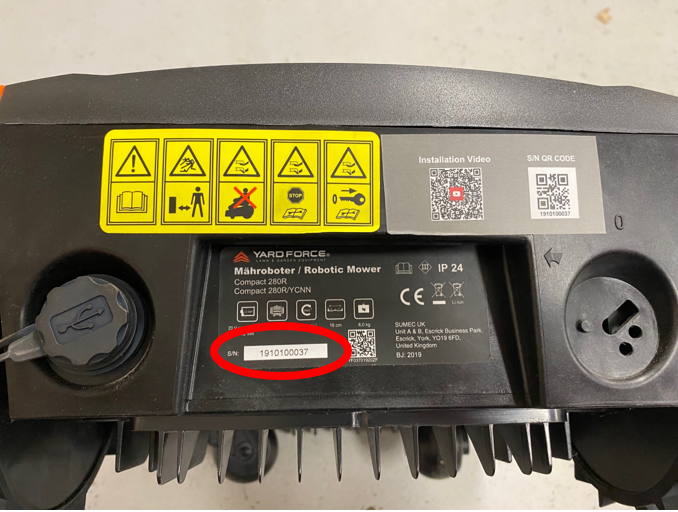
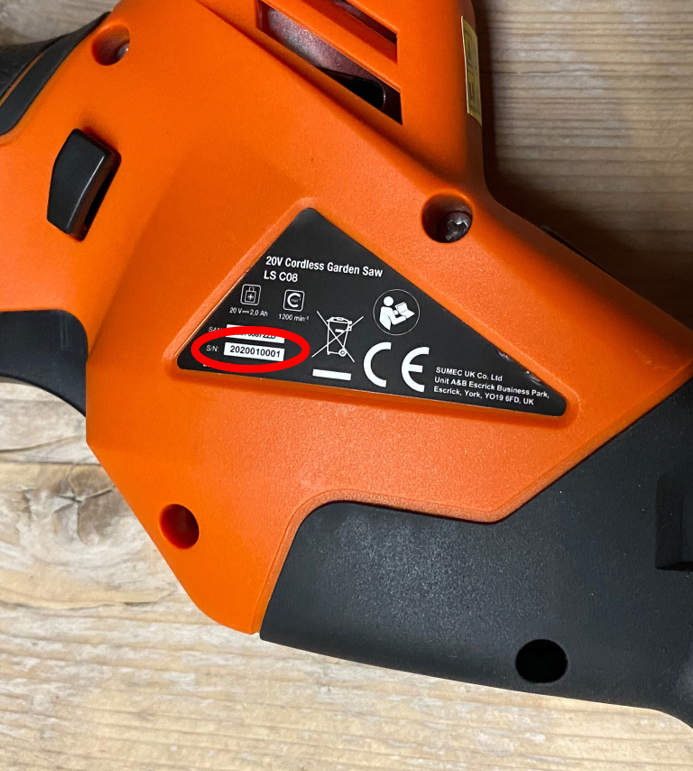
Your product's serial number is located on a rating label (sticker) attached to the machine. It is usually found alongside the model number and other product information and consists only of numbers.
Tip: You'll often need your serial number when registering your product, making a warranty claim, or contacting customer support.
What Is a Serial Number?
A serial number is a unique identifier assigned to your individual product.
It helps us:
- Identify your specific product
- Verify warranty information
- Locate the correct replacement parts
- Provide accurate technical support
Important: The serial number is different from the model number. Both may appear on the same label but are used for different purposes.
Where to Find the Serial Number
The serial number is printed on a product information sticker attached to your machine.
Depending on the product, the label may be located:
- On the side of the machine
- Underneath the product
- On the rear of the product
- Inside the battery compartment (on some models)
- Near the motor housing or chassis
The exact location varies depending on the product type.
How to Identify the Serial Number
When viewing the product label:
- Look for a number consisting only of digits
- It may be identified by "S/N" (Serial Number), although not all products use this label
- It is usually printed near the model number and manufacturing information
Take care not to confuse the serial number with:
- Model number
- Product code
- Barcode
- Manufacturing date
Why Do We Need the Serial Number?
Providing your serial number helps us:
- Confirm your product details
- Check warranty eligibility
- Identify the correct spare parts
- Resolve technical support queries more quickly
Having both the model number and serial number available will help us provide faster assistance.
Frequently Asked Questions
Where is the serial number located?
The serial number is printed on a product information sticker attached to your machine. The exact location varies depending on the product.
Is the serial number the same as the model number?
No. The serial number uniquely identifies your individual product, while the model number identifies the product model.
Does the serial number always start with "S/N"?
Not always. Some products label the serial number as "S/N", while others simply display the number without a label.
What does a serial number look like?
It normally consists only of numbers and is printed alongside other product information on the rating label.
Why do I need the serial number?
You'll need it when contacting customer support, checking your warranty, ordering parts, or registering your product.
Warranty Periods by Brand
The warranty period for your product depends on the brand and begins from the original date of purchase.
| Challenge | 1 year from the date of purchase |
| Ferrex | 3 years from the date of purchase |
| Hawksmoor | 2 years from the date of purchase |
| McAllister | 2 years from the date of purchase |
| McGregor | 2 years from the date of purchase |
| Parkside | 3 years from the date of purchase |
| Powerbase (purchased from The Range) | 2 years from the date of purchase |
| Sovereign | 1 year from the date of purchase |
| Spear & Jackson | 3 years from the date of purchase |
| Wessex | 2 years from the date of purchase |
| Yard Force | 2 years from the date of purchase, plus an additional 1 year if the product is registered on the Yard Force website |
Important Information
Manufacturer warranties are only valid when accompanied by a valid proof of purchase.
For full warranty terms, conditions, and exclusions, please refer to your product's user manual.
Mix Two-Stroke Fuel the Right Way (40:1)
Quick Answer
To mix two-stroke fuel at a 40:1 ratio, use fresh unleaded petrol and high-quality two-stroke oil. Measure both accurately using a 40:1 mixing bottle, secure the lids, and shake thoroughly before filling your machine.
Tip: Always use fresh petrol that is less than 30 days old for the best engine performance and reliable starting.
Before You Start
Correctly mixed fuel is essential for the performance and lifespan of your two-stroke engine.
Using the wrong fuel mixture can cause:
- Poor engine performance
- Excessive exhaust smoke
- Spark plug fouling
- Difficult starting
- Engine overheating
- Permanent engine damage
Always:
- Use fresh unleaded petrol
- Use high-quality two-stroke engine oil
- Mix fuel in a clean, approved fuel container
- Follow the recommended 40:1 fuel-to-oil ratio
Important: Never use straight petrol in a two-stroke engine, as this can cause severe engine damage.
Watch the Assembly and Operation Video
What You'll Need
Before mixing the fuel, gather the following:
- 40:1 two-stroke mixing bottle
- High-quality two-stroke engine oil
- Fresh unleaded petrol (less than 30 days old)
- Funnel
How to Mix 40:1 Two-Stroke Fuel
Follow these steps to prepare the correct fuel mixture.
1. Check the correct fuel ratio
Confirm that your product requires a 40:1 fuel mixture by referring to the user manual.
Important: Always use the fuel ratio specified for your particular machine.
2. Fill the petrol reservoir
Pour fresh unleaded petrol into the petrol section of the mixing bottle until it reaches the 10 marker.
Avoid overfilling.
3. Fill the oil reservoir
Pour two-stroke oil into the oil section of the mixing bottle until it reaches the corresponding 10 marker.
Accurate measurements ensure the correct 40:1 mixture.
4. Secure the lids
Ensure both the petrol and oil compartment lids are tightly closed before mixing.
Check that the caps are fully sealed to prevent leaks.
5. Mix thoroughly
Shake the mixing bottle thoroughly until the petrol and oil are completely combined.
Your two-stroke fuel is now ready to use.
Use the mixture as soon as possible for the best performance.
Fuel Storage Tips
For best results:
- Use fuel within 30 days of mixing
- Store fuel in an approved fuel container
- Keep fuel in a cool, dry, well-ventilated area
- Keep fuel away from heat, sparks and naked flames
- Dispose of old fuel safely in accordance with local regulations
Important Information
- Always use fresh unleaded petrol.
- Only use quality two-stroke engine oil.
- Never use old or contaminated fuel.
- Never use straight petrol in a two-stroke engine.
- Always mix the fuel thoroughly before filling the fuel tank.
Frequently Asked Questions
What does a 40:1 fuel ratio mean?
A 40:1 ratio means 40 parts unleaded petrol to 1 part two-stroke engine oil.
Can I use old petrol?
No. Petrol older than 30 days can reduce engine performance and make starting more difficult.
What happens if I don't mix the fuel correctly?
Using too much or too little oil can cause excessive smoke, poor performance, overheating or serious engine damage.
Can I use any two-stroke oil?
For the best performance, use a high-quality two-stroke engine oil that meets the specifications recommended in your product manual.
Should I shake the fuel before using it?
Yes. Always shake the fuel mixture thoroughly to ensure the petrol and oil are fully combined before filling your machine.
View Article