
Lawnmower
Lawnmower
Electrical Lawnmower Garden Product

How do I start my Electric Lawnmower
Quick Answer
To start your electric lawnmower, plug the power cable into a mains socket, press and hold the safety button on the switch box, then pull the switch bar towards the handle. To stop the mower, simply release the switch bar.
Tip: Always check that the power cable is safely positioned behind you before mowing to prevent accidentally cutting it.
Before You Start
Before operating your electric lawnmower:
- Read the user manual
- Place the mower on a flat, stable surface
- Inspect the power cable for any signs of damage
- Ensure the cutting area is free from stones, branches and other debris
Always:
- Wear suitable footwear and eye protection
- Keep hands and feet away from the cutting blade
- Use an outdoor-rated extension lead if required
Important: Never use the lawnmower if the power cable, plug or extension lead is damaged.
How to Start Your Electric Lawnmower
Follow these steps to start the mower safely.
1. Connect the power
Plug the lawnmower power cable into a suitable mains socket.
If using an extension lead, ensure it is fully unwound and suitable for outdoor use.
2. Press the safety button
Locate the safety button on the switch box.
Press and hold the button.
3. Pull the switch bar
While continuing to hold the safety button:
- Pull the switch bar towards the handle
- The motor will start
Once the motor is running, you can release the safety button while continuing to hold the switch bar.
How to Stop Your Electric Lawnmower
To stop the mower:
- Release the switch bar
The motor will stop immediately.
If the Lawnmower Will Not Start
If the mower does not start:
- Check that the mains socket has power
- Inspect the power cable and plug for damage
- Check any extension lead is fully connected
- Verify that any fuse has not blown
- Ensure the safety button and switch bar are being operated correctly
If all of the above have been checked and the mower still does not start, there may be an internal electrical or motor fault.
Important Safety Tips
- Keep the power cable behind you while mowing
- Never lift or tilt the mower while the blade is rotating
- Disconnect the mower from the mains before carrying out maintenance
- Do not use the mower in wet conditions
- Store the mower in a dry location after use
Frequently Asked Questions
How do I start my electric lawnmower?
Plug the mower into a mains socket, press and hold the safety button, then pull the switch bar towards the handle.
How do I stop the mower?
Release the switch bar and the motor will stop immediately.
Why won't my electric lawnmower start?
Check the mains power supply, plug, extension lead, fuse and power cable. If these are all working correctly, the mower may have an internal electrical or motor fault.
Can I use an extension lead?
Yes. Use a suitable outdoor-rated extension lead that is fully unwound during use.
What should I do if the mower still doesn't work?
If the mower still will not start after completing these checks, please contact our Technical Support Team for further assistance.
My Electric Lawnmower is smoking and smells of burning
Quick Answer
If your electric lawnmower is producing smoke, has a burning smell, or shows signs of melting or internal damage, stop using it immediately. Switch the mower off, disconnect it from the mains power supply, and contact our Technical Support Team.
Important: Do not continue using the lawnmower, as this could result in further damage or present a safety risk.
Before You Start
If you notice smoke, a burning smell, or visible damage:
- Switch the lawnmower off immediately
- Disconnect it from the mains power supply
- Allow the mower to cool before handling it
Do not:
- Continue operating the mower
- Attempt to dismantle or repair the product
- Reconnect the mower to the power supply
Important: Smoke or a burning smell may indicate an internal electrical or motor fault.
What Should I Do?
Follow these steps immediately.
1. Switch the mower off
Release the switch bar and ensure the motor has stopped completely.
2. Disconnect the power supply
Unplug the lawnmower from the mains socket.
If you are using an extension lead, disconnect the extension lead safely before moving the mower.
3. Inspect the mower
Look for signs of:
- Smoke
- Burning odours
- Melted plastic
- Burn marks
- Broken or damaged components
Do not attempt to use the mower if any of these signs are present.
What Happens Next?
Please contact our Technical Support Team as soon as possible.
Our team will:
- Assess the reported fault
- Advise on the appropriate next steps
- Discuss warranty support where applicable
Depending on the fault, you may be asked to return the product for inspection.
Warranty Information
If your lawnmower is within its warranty period, our Technical Support Team will advise you on the available warranty options.
Please note that assistance for this type of failure may not be available once the warranty period has expired.
Important Safety Information
- Never continue using a mower that is smoking or smells of burning.
- Do not attempt to repair electrical or internal motor components yourself.
- Always disconnect the mower from the mains before inspecting it.
- Keep the product away from combustible materials until it has cooled completely.
Frequently Asked Questions
Why is my electric lawnmower smoking?
Smoke is usually caused by an internal electrical or motor fault. Stop using the mower immediately and disconnect it from the power supply.
What does a burning smell mean?
A burning smell can indicate overheating, electrical failure, or damage to internal components.
Can I continue using the mower if the smell disappears?
No. If the mower has produced smoke or a burning smell, it should not be used again until it has been assessed by our Technical Support Team.
Can I repair the mower myself?
No. Do not attempt to open or repair the lawnmower, as this may present a safety risk and could affect your warranty.
What should I do next?
Disconnect the mower from the mains supply and contact our Technical Support Team for further advice.
View ArticleHow do I assemble the handles on my Electric Lawnmower
Quick Answer
To assemble the handles on your electric lawnmower, fit the lower handles into the mower body, then attach the upper handle using the quick-release clamps. Ensure the bolts, washers and locking levers are fitted in the correct order before tightening.
Tip: Handle assembly varies slightly between models, but the quick-release clamps are assembled in the same way on most electric lawnmowers.
Before You Start
Before assembling the handles:
- Ensure the lawnmower is switched off
- Disconnect the mower from the mains power supply
- Lay the mower on a flat, stable surface
- Check that all supplied fixings are present
Important: Do not connect the mower to the power supply until assembly is complete.
How to Assemble the Lower Handles
Some models have lower handles that slot directly into the mower body.
1. Insert the lower handles
- Slide each lower handle fully into its mounting point
- Ensure both sides are inserted to the same depth
Some force may be required to fully seat the handles.
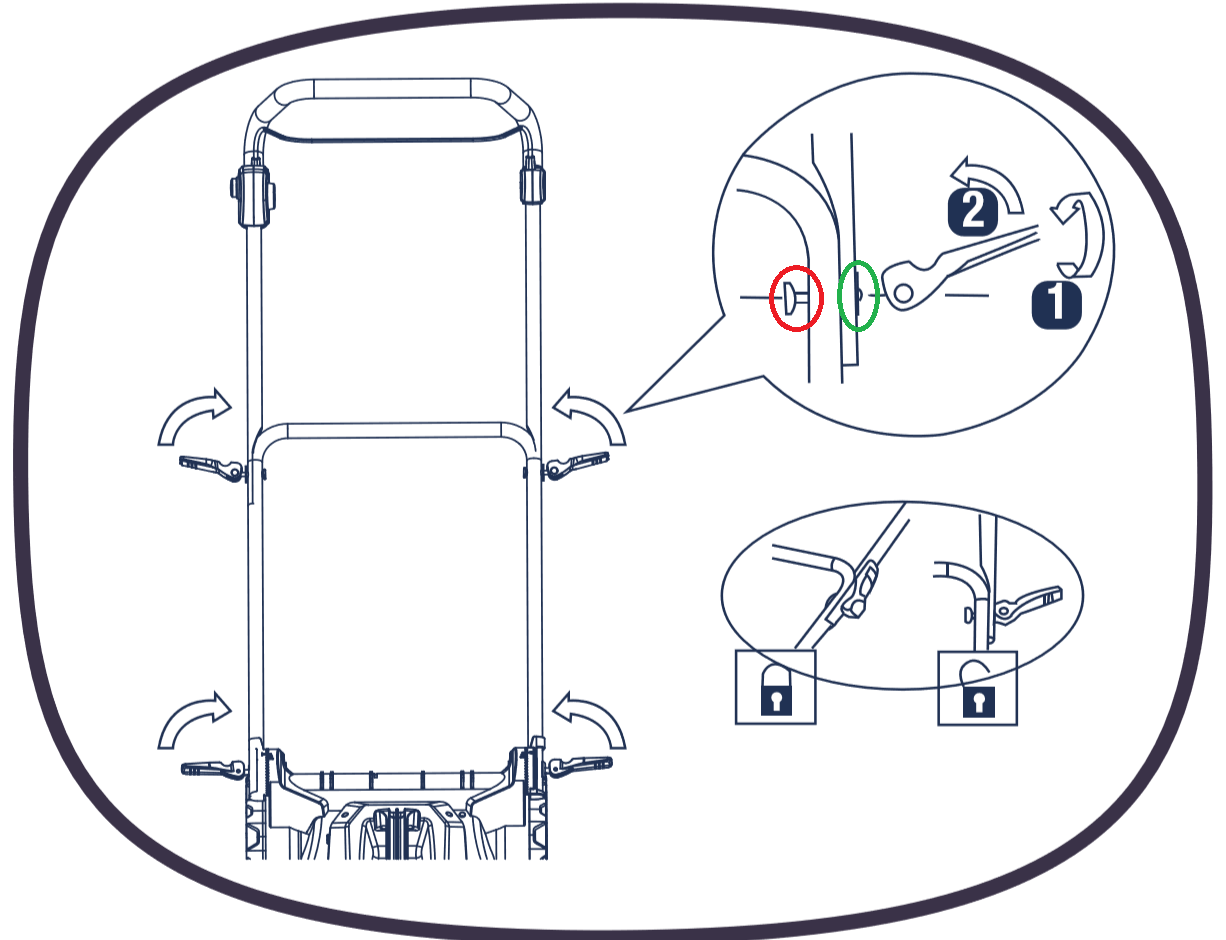
2. Secure the handles
Using the supplied screws:
- Align the fixing holes
- Tighten the screws securely
Check that the lower handles do not move once installed.
How to Assemble the Quick-Release Handle Clamps
The upper and lower handles are connected using quick-release clamps.
1. Insert the bolt
Insert the bolt through the handle from the inside of the frame.
The bolt head should sit on the inside of the handle.
2. Fit the washer
Place the washer over the threaded end of the bolt on the outside of the handle.
Ensure the washer sits flat against the handle frame.
3. Attach the quick-release lever
Thread the quick-release clamp onto the bolt.
Tighten until the handle is secure.
Push the quick-release lever down to lock the handle firmly into position.
Repeat the process on the opposite side.
Check the Handle Assembly
Before using the lawnmower:
- Ensure both quick-release levers are fully locked
- Check all screws are tightened securely
- Confirm the handles are stable and do not move during use
If You Are Still Having Problems
If:
- The bolt does not appear to be long enough
- The handles do not align correctly
- The quick-release clamps cannot be tightened
- The handles remain loose after assembly
Please contact our Technical Support Team for further assistance.
Important Assembly Tips
- Assemble all components before fully tightening the fixings.
- Ensure bolts, washers and quick-release levers are fitted in the correct order.
- Do not overtighten the quick-release clamps.
- Check all handle fixings before each use.
Frequently Asked Questions
How should the quick-release clamp be assembled?
Insert the bolt from the inside of the handle, fit the washer on the outside, thread the quick-release lever onto the bolt, tighten it, then push the lever down to lock it.
Why doesn't the bolt seem long enough?
This is usually caused by the components not being assembled in the correct order or the handle sections not being fully aligned.
Do the lower handles push into the mower?
Yes. On many models, the lower handles slot into the mower body before being secured with the supplied screws.
How do I know the handles are secure?
The handles should not move once all screws and quick-release clamps have been tightened and locked.
What should I do if I still can't assemble the handles?
If you have followed these instructions and the handles still do not fit correctly, please contact our Technical Support Team for further assistance.
My wheel keeps falling off my Electric Lawnmower
Quick Answer
If a wheel keeps falling off your electric lawnmower, it is usually because the axle fixing components have become loose or detached. Check that the washer, circlip or locking ring (depending on your model) is correctly fitted and that the wheel bearing is properly seated.
Tip: Wheel fixings can loosen over time due to vibration during normal use, so it's a good idea to inspect them periodically.
Before You Start
Before inspecting the wheel:
- Switch the lawnmower off
- Disconnect it from the mains power supply
- Place the mower on a flat, stable surface
Always:
- Wear protective gloves
- Ensure the mower cannot move while carrying out checks
Important: Never inspect or repair the wheel while the mower is connected to the power supply.
Why Does the Wheel Keep Falling Off?
The most common causes are:
- The washer has come loose or is missing
- The circlip has become detached
- The locking ring is damaged or missing (on some models)
- The wheel bearing is not seated correctly
- Normal vibration has loosened the wheel fixings during use
You may also hear a rattling noise from inside the wheel if one of the retaining components has become loose.
How to Fix the Wheel (34 cm Models and Larger)
Follow these steps to refit the wheel.
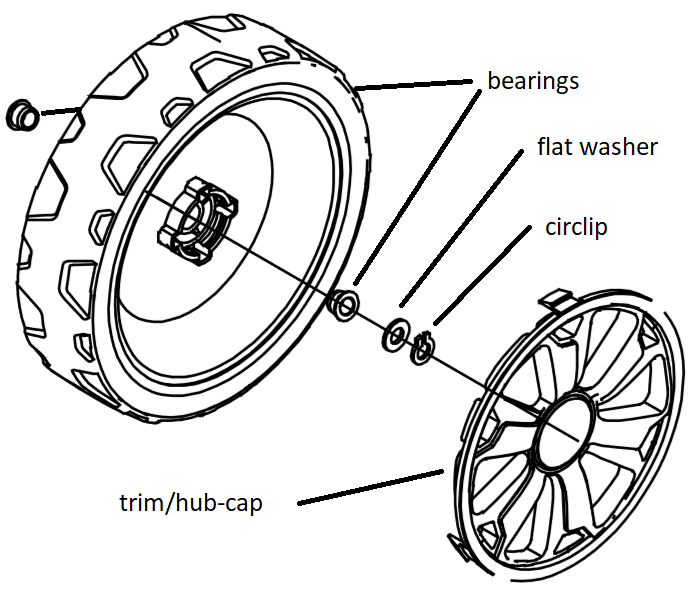
1. Remove the wheel trim
Carefully remove the hub cap (wheel trim) to expose the axle fixing components.
2. Check the retaining parts
Locate the:
- Flat washer
- Circlip
These components may have become loose inside the wheel.
Inspect them for damage or loss.
3. Check the wheel bearing
Ensure the metal bearing is fully seated inside the centre of the wheel.
If the bearing is not positioned correctly, the wheel may not fit securely.
4. Refit the wheel
Slide the wheel fully onto the axle.
Reinstall:
- The flat washer
- The circlip
Ensure both components are fitted tightly against the wheel bearing.
5. Refit the wheel trim
Push the hub cap back into position until it is securely fitted.
Smaller Models (Approximately 32 cm)
Some smaller electric lawnmowers use a different wheel fixing system.
Instead of a washer and circlip, these models may use:
- A locking ring
Some models also have wheel bearings integrated into the wheel itself.
The general inspection process remains the same.
If Parts Are Missing
If any of the following are missing:
- Washer
- Circlip
- Locking ring
- Wheel bearing
Please contact our Technical Support Team.
Replacement parts may be available depending on your model and warranty status.
Alternative Solution – Star Washers
If the wheel continues to become loose after refitting the original components, our Technical Support Team may recommend fitting star washers.
These can provide additional grip on the axle and help improve wheel retention.
Important Maintenance Tips
- Check the wheel fixings regularly
- Inspect the wheel bearings for wear
- Replace damaged retaining clips immediately
- Ensure the wheel is fully seated on the axle before use
- Stop using the mower if the wheel becomes loose during operation
Frequently Asked Questions
Why does my lawnmower wheel keep falling off?
The retaining components, such as the washer, circlip or locking ring, may have become loose due to vibration or may be missing.
What holds the wheel onto the axle?
Depending on the model, the wheel is secured using either a flat washer and circlip or a locking ring.
What should I do if the retaining parts are missing?
Please contact our Technical Support Team. We can advise on obtaining replacement parts where applicable.
What are star washers?
Star washers are retaining washers that provide additional grip on the axle and may be recommended if the wheel repeatedly comes loose.
Can I continue using the mower if the wheel is loose?
No. Stop using the lawnmower immediately and secure or replace the retaining components before further use.
My Electric Lawnmowers motor is running but the blade will not
Quick Answer
If your electric lawnmower motor is running but the blade is not turning, the most likely cause is a worn or broken drive belt. Some models have replacement drive belts available, while others do not.
Tip: Do not continue using the lawnmower if the motor is running but the blade is stationary, as this could cause further damage.
Before You Start
Before inspecting your lawnmower:
- Switch the mower off
- Disconnect it from the mains power supply
- Allow all moving parts to come to a complete stop
Always wear protective gloves when working near the cutting blade.
Important: Never inspect the underside of the mower while it is connected to the power supply.
Why Is the Motor Running but the Blade Not Turning?
In most cases, this indicates that the drive belt has worn, slipped or broken.
The drive belt transfers power from the motor to the cutting blade. If it fails, the motor may continue to run normally while the blade remains stationary.
Check Whether a Replacement Belt Is Available
Replacement drive belts are only available for selected lawnmower models.
To find out whether a replacement belt is available:
- Check our website for compatible spare parts
- Contact our Technical Support Team with your model number
Replacing the Drive Belt
If a replacement belt is available for your model:
- Ensure the mower is disconnected from the power supply
- Follow the instructions provided for your model
- Fit the replacement belt carefully
Please note that replacing a drive belt can require significant force and careful alignment.
Incorrect installation may prevent the lawnmower from operating correctly.
If Your Lawnmower Is Within Warranty
If your lawnmower is still within its warranty period and:
- A drive belt is not available
- You are unable to replace the belt yourself
Please contact our Technical Support Team.
We'll advise you on the appropriate next steps, including any warranty support that may be available.
Important Information
- Do not continue using the mower if the blade is not rotating.
- Replacement drive belts are not available for every model.
- Always disconnect the mower from the mains before carrying out any inspection or repair.
- If you are unsure whether the belt has failed, contact our Technical Support Team for advice.
Frequently Asked Questions
Why is my motor running but the blade isn't turning?
The most common cause is a worn, damaged or broken drive belt that is no longer transferring power from the motor to the blade.
Can I replace the drive belt myself?
Yes, on models where replacement belts are available. However, fitting the belt can be difficult and must be carried out correctly.
Do you sell replacement drive belts?
Replacement drive belts are only available for selected lawnmower models. Please check our website or contact our Technical Support Team to confirm availability.
Can I continue using the mower?
No. If the motor is running but the blade is not turning, stop using the mower immediately to avoid further damage.
What if my mower is still under warranty?
If your mower is within its warranty period and you cannot replace the drive belt, please contact our Technical Support Team for further assistance.
How do I remove the blade on my Electric Lawnmower
Quick Answer
To remove the blade from your electric lawnmower, disconnect the mower from the power supply, secure the blade to prevent it from turning, and use a socket wrench to loosen the blade fixing bolt by turning it anti-clockwise.
Important: This procedure does not apply to hover mowers.
Before You Start
Before removing the blade:
- Switch the lawnmower off
- Disconnect it from the mains power supply
- Place the mower on a flat, stable surface
- Wear suitable protective gloves
Warning: The blade is sharp, even if it appears worn. Handle it with extreme care to avoid injury.
How to Remove the Blade
Follow these steps to safely remove the blade.
1. Secure the blade
Prevent the blade from rotating by placing a suitable wooden block between the blade and the mower deck.
This will hold the blade securely while you loosen the fixing bolt.
Important: Do not use your hand to stop the blade from turning.
2. Loosen the fixing bolt
Using a suitable socket wrench:
- Fit the socket securely onto the blade fixing bolt.
- Turn the bolt anti-clockwise to loosen it.
- Apply steady pressure if the bolt is tight.
- Once loosened, continue unscrewing until the bolt is fully removed.
3. Remove the blade
Carefully lift the blade away from the mower.
Take care not to touch the sharp cutting edges.
If you are replacing the blade, note its orientation before removal to ensure the new blade is fitted correctly.
If the Blade Is Stuck
If the blade fixing bolt is difficult to remove:
- Check that the blade is securely restrained.
- Use a correctly sized socket wrench.
- Apply firm, steady pressure rather than sudden force.
Do not use excessive force that could damage the fixing bolt or mower.
Important Information
- This procedure is not suitable for hover mowers.
- Always disconnect the mower from the mains before working on the blade.
- Inspect the blade and fixing bolt for wear or damage before refitting.
- Replace damaged blades with genuine replacement parts suitable for your model.
If You Need Assistance
If you are unable to remove the blade safely or the fixing bolt cannot be loosened, please contact our Technical Support Team for further assistance.
Frequently Asked Questions
Which direction do I turn the blade bolt?
Turn the blade fixing bolt anti-clockwise to loosen and remove it.
How do I stop the blade from turning?
Use a suitable wooden block to hold the blade securely against the mower deck while loosening the fixing bolt.
Can I use my hands to hold the blade?
No. Never hold the blade by hand while removing the fixing bolt. Always use a suitable block to prevent the blade from rotating.
Does this guide apply to hover mowers?
No. This procedure does not apply to hover mowers, which may use a different blade fixing system.
What should I do if I can't remove the blade?
If the blade or fixing bolt cannot be removed safely, please contact our Technical Support Team for assistance.
My Electric Lawnmower is losing power
Quick Answer
If your electric lawnmower is losing power during use, it is usually caused by cutting conditions or airflow restrictions. The most common causes are wet or long grass, blocked air vents, or debris around the blade area.
Tip: Electric lawnmowers perform best when used regularly on dry, moderately short grass.
Before You Start
Before carrying out any checks:
- Switch the lawnmower off
- Disconnect it from the mains power supply
- Allow all moving parts to stop completely
- Ensure the mower is placed on a stable surface
Important: Never attempt to inspect or clean the mower while it is connected to power.
Possible Causes and Checks
1. Cutting conditions
Check whether:
- The grass is too long
- The grass is wet or damp
Cutting heavy or wet grass can overload the motor and cause a drop in performance.
To improve results:
- Cut dry grass only where possible
- Increase cutting height for longer grass
- Mow more frequently to avoid heavy build-up
2. Air vents blocked
Inspect the mower housing and check that air vents are not blocked by:
- Grass clippings
- Dust
- Dirt or debris
Blocked airflow can cause the motor to work harder and reduce power.
Clean vents carefully to restore airflow.
3. Blade area obstruction
Check underneath the mower for:
- Built-up grass
- Compact debris
- Blockages around the blade housing
A clogged blade area can restrict movement and reduce cutting efficiency.
Ensure the underside is clear before reuse.
If the Issue Persists
If the mower continues to lose power after completing the checks above:
- Stop using the product
- Contact our Technical Support Team
- Provide your model number and description of the issue
If your product is within warranty, support options may include further diagnosis, repair, or replacement depending on the fault.
Important Information
- Do not overload the mower with long or wet grass
- Always keep air vents clean and unobstructed
- Regular maintenance helps maintain consistent performance
- Do not continue using the mower if performance continues to drop significantly
Frequently Asked Questions
Why is my electric lawnmower losing power?
It is usually due to wet or long grass, blocked air vents, or debris around the blade area causing the motor to work harder.
Can wet grass cause power loss?
Yes. Wet grass increases resistance and can overload the motor, resulting in reduced performance.
How often should I clean the mower?
It is recommended to clean the air vents and underside of the mower after each use.
What should I do if cleaning does not fix the issue?
If the problem continues after cleaning and checking cutting conditions, contact our Technical Support Team for further assistance.
My Electric Lawnmower is having issues with the height adjustment
Quick Answer
If your electric lawnmower height adjustment is not working correctly, it is usually caused by dirt or debris restricting the lever or a stiff adjustment mechanism. In most cases, cleaning and light lubrication will restore normal operation.
Tip: The cutting height is typically adjusted using a lever that controls the position of the axle or deck.
Before You Start
Before carrying out any checks or adjustments:
- Switch the lawnmower off
- Disconnect it from the mains power supply
- Ensure all moving parts have stopped completely
- Place the mower on a stable surface
Important: Never attempt to adjust or inspect the mechanism while the mower is connected to power.
Possible Causes and Basic Checks
1. Debris build-up
Check the height adjustment lever and surrounding mechanism for:
- Grass clippings
- Dirt
- Dust or compacted debris
Build-up in this area can restrict movement and prevent the lever from operating smoothly.
Carefully clean the area to restore normal function.
2. Stiff adjustment lever
If the lever feels stiff or difficult to move:
- Apply a suitable lubricant such as WD-40
- Move the lever back and forth to distribute the lubricant evenly
This should help restore smooth movement.
How to Adjust the Cutting Height
Follow these steps to adjust the cutting height correctly:
1. Release the lever
Pull the cutting height adjustment lever outwards.
2. Select height
Move the lever forwards or backwards to choose the desired cutting height.
3. Lock into position
Return the lever to its locked position and ensure it is securely engaged.
Important: Do not use the mower unless the lever is fully locked.
Cutting Height Information
Most electric lawnmowers offer cutting heights typically ranging from:
- 25mm to 75mm
- Positions 1 to 7 (depending on model)
Always refer to your model specification for exact settings.
If the Issue Persists
If the height adjustment still does not function correctly after cleaning and lubrication:
- Stop using the mower
- Contact our Technical Support Team
- Provide your model number and details of the issue
There may be an issue with the internal linkage between the adjustment lever, rear axle, and connecting rod.
Important Information
- Always keep the adjustment mechanism clean and free from debris
- Do not force the lever if it becomes stuck
- Apply lubricant only if the mechanism is stiff
- Ensure the lever is fully locked before use
Frequently Asked Questions
Why is my height adjustment lever stiff?
This is usually caused by dirt or grass build-up in the mechanism or lack of lubrication.
What is the cutting height range?
Most models range from approximately 25mm to 75mm, depending on the setting.
Can I use the mower if the lever is not locked?
No. The lever must be fully locked in place before operating the mower.
What should I do if lubrication does not fix the issue?
If the lever still does not work after cleaning and lubrication, contact our Technical Support Team for further assistance.
My Electric Lawnmower is vibrating excessively
Quick Answer
Excessive vibration in an electric lawnmower is most commonly caused by a damaged, unbalanced, or worn blade. In many cases, the blade will need to be inspected and replaced to resolve the issue.
Tip: Even a small impact with a stone or hard object can cause blade imbalance and vibration.
Before You Start
Before inspecting the mower:
- Switch the lawnmower off
- Disconnect it from the mains power supply
- Ensure the blade has completely stopped
- Place the mower on a stable surface
Important: Always wear protective gloves when working near the blade.
Possible Cause
The most common cause of excessive vibration is blade damage or imbalance.
This may happen if:
- The blade has struck a stone, root, or other hard object
- The blade is worn, bent, or rusty
- The lugs on the blade adapter have sheared or become damaged
If any of the above apply, the blade should be replaced before further use.
If the Blade Is Damaged and Stuck
If the blade is damaged and difficult to remove, follow these steps carefully.
1. Secure the blade
Place a suitable wooden block between the blade and the mower deck to prevent movement.
2. Loosen the fixing bolt
Using a socket wrench:
- Fit the wrench onto the blade fixing bolt
- Turn the bolt anti-clockwise to loosen it
- Apply steady pressure if required
- Continue until the bolt is fully removed
3. Remove and replace the blade
- Carefully remove the damaged blade
- Fit a new compatible blade onto the blade adapter
- Refit the blade fixing bolt
- Tighten securely
Important: Ensure the blade is fitted in the correct orientation before tightening.
If the Issue Persists
If excessive vibration continues after replacing the blade:
- Stop using the mower
- Contact our Technical Support Team
- Provide your model number and details of the issue
There may be a deeper issue with the blade adapter or internal drive components.
Important Information
- Never operate the mower with a damaged or unbalanced blade
- Always inspect the blade after hitting hard objects
- Replace worn or bent blades immediately
- Ensure all fixings are securely tightened before use
Frequently Asked Questions
Why is my lawnmower vibrating so much?
The most common cause is a damaged or unbalanced blade, often caused by impact with stones or hard objects.
Can I still use the mower if it vibrates?
No. Stop using the mower immediately, as continued use may cause further damage or unsafe operation.
Do I need to replace the blade if it is slightly bent?
Yes. Even minor bending can cause imbalance and excessive vibration.
What if vibration continues after replacing the blade?
If the issue persists, contact our Technical Support Team, as there may be damage to the blade adapter or internal components.
My Electric Lawnmower is cutting uneven and rough
Quick Answer
If your electric lawnmower is cutting unevenly or leaving a rough finish, it is usually caused by a damaged, blunt, or incorrectly fitted blade, or a build-up of grass and debris under the deck.
Tip: A sharp, balanced blade and a clean mower deck are essential for an even cut.
Before You Start
Before inspecting or maintaining your lawnmower:
- Switch the mower off
- Disconnect it from the mains power supply
- Ensure the blade has completely stopped
- Place the mower on a stable surface
Important: Always wear protective gloves when working near the blade.
Possible Causes and Basic Checks
1. Blade condition
Check whether the blade is:
- Blunt
- Worn
- Damaged
- Bent or unbalanced
Blade damage may occur due to:
- Contact with stones, roots, or other hard objects
- Rust or corrosion over time
- Damage to the blade adapter, such as sheared lugs
If any of the above apply, the blade should be replaced.
2. Underside of mower deck
Inspect the underside of the mower and check for:
- Built-up grass clippings
- Compact debris
- Blockages around the blade area
Clear any debris before using the mower again.
A clean deck helps maintain airflow and cutting efficiency.
If the Blade Is Damaged and Stuck
If the blade is damaged and difficult to remove, follow these steps carefully.
1. Secure the blade
Place a suitable wooden block between the blade and mower deck to prevent movement.
2. Loosen the fixing bolt
Using a socket wrench:
- Fit the wrench onto the blade fixing bolt
- Turn the bolt anti-clockwise to loosen it
- Apply steady pressure if required
- Continue until the bolt is fully loosened and removed
3. Remove and replace the blade
- Carefully remove the blade
- Fit a new compatible blade onto the blade adapter
- Refit the blade fixing bolt
- Tighten securely before use
Important: Ensure the blade is fitted in the correct orientation before tightening.
If the Issue Persists
If the mower continues to cut unevenly after cleaning and replacing or checking the blade:
- Stop using the product
- Contact our Technical Support Team
- Provide your model number and a description of the issue
There may be an issue with blade alignment or internal components.
Important Information
- Always use a sharp, undamaged blade
- Clean the mower deck regularly
- Replace blades that are bent or worn
- Ensure the blade is securely fitted before each use
- Do not operate the mower if cutting performance is poor or unstable
Frequently Asked Questions
Why is my lawnmower cutting uneven?
This is usually caused by a blunt, damaged, or incorrectly fitted blade, or a blocked mower deck.
Do I need to replace a blunt blade?
Yes. A blunt blade will tear grass rather than cut it cleanly, resulting in an uneven finish.
Can grass build-up affect cutting performance?
Yes. Build-up under the mower deck can restrict airflow and affect cutting quality.
What should I do if replacing the blade does not fix the issue?
If the problem continues after replacing the blade and cleaning the deck, contact our Technical Support Team for further assistance.
I have cut through the power cable on my Electric Lawnmower
Quick Answer
If you have accidentally cut or damaged the power cable on your electric lawnmower, stop using the product immediately and disconnect it from the mains power supply. The mower must not be used again until the cable has been professionally inspected or repaired.
Important: A damaged power cable is a serious safety risk and must not be used under any circumstances.
Important Information
Damage to the power cable is considered accidental user damage.
This means:
- The product warranty will be invalidated
- Repairs are not covered under standard warranty terms
- Safety responsibility transfers to the user once damage has occurred
What You Should Do
1. Stop using the mower
Do not attempt to switch the mower back on or test it.
2. Do not attempt a DIY repair
Do not:
- Tape the cable
- Join or splice the cable
- Attempt electrical repairs yourself
This can create a serious electrical hazard.
3. Arrange a safe repair
A qualified electrician may be able to repair the cable safely.
Please note:
- Any repair work will be at your own cost
- Repairs must meet electrical safety standards
Important Safety Information
- Never use a lawnmower with a damaged power cable
- Do not attempt temporary fixes such as insulation tape
- Always ensure cables are fully intact before use
- Keep cables away from cutting blades during operation
Frequently Asked Questions
Can I still use my lawnmower if the cable is slightly damaged?
No. Any damage to the power cable means the mower must not be used.
Can I repair the cable myself?
No. Electrical repairs should only be carried out by a qualified electrician.
Does this damage affect my warranty?
Yes. Cutting or damaging the power cable is considered user damage and will invalidate the warranty.
Can I replace the cable?
In some models with detachable extension cables, a replacement may be possible. Otherwise, a qualified repair is required.
What should I do next?
Disconnect the mower from the mains immediately and arrange a professional repair or contact our Technical Support Team for guidance.